This post will show you how to write a Unit Test in Go using VS Code. All the code examples can be found up on GitHub.
Setup
Create a new directory using a name of your choice and then open the directory in VS Code. Start the Integrated Terminal and create a new module using the following command:
go mod init greeting
The function under test
Create a new file named greeting.go in the same directory as the module and either type or paste the following code:
package greeting

func Greeting(name string) string {
	return "Hello, " + name
}
This function returns a greeting to the name specified by the name parameter.
First Test
In the same directory where the greeting.go file was created create another new file called greeting_test.go and either type or paste the code block below into it:
package greeting

import "testing"

func TestGreetingWithName(t *testing.T) {
	got := Greeting("John")
	expect := "Hello, John"

	if got != expect {
		t.Errorf("Did not get the expected result. Wanted %s got %s", got, expect)
	}
}
The first thing to note is Go is opinionated in how testing objects should be named. The source code file containing the tests should have a _test.go suffix, so in this example the test file is called greeting_test.go and each test function should begin with the word Test followed by an upper case character so in this example the Function is called TestGreetingWithName.
Test functions should accept one parameter of type *testing.T and is used by Go to report what has happened during the execution of the test.
The body of the function has the expected Unit Test pattern of Arrange, Act & Assert If. The testing functionality that ships with Go uses the If statement to compare the results of the test instead of Assert. This was a conscious decision by the Go development team so test code doesn’t differ from program code.
In the example, the function under test is called and the result stored in the variable got. The variable named expect stores what the function should return. The got and expect variables are compared and if different, the Errorf method reports the problem, replacing the two string format specifiers (%s) with the values of the got and expect variables respectively.
Executing the Test
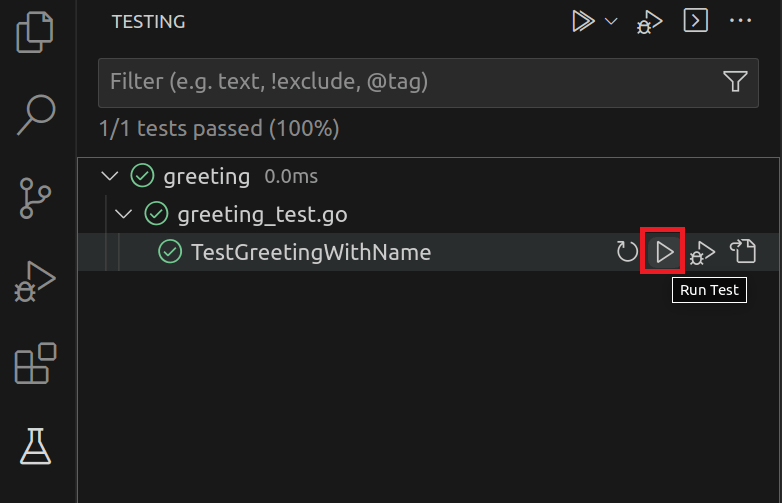
The Test UI built into VS Code makes the running of one or more of your tests easy to accomplish. From the Visual Studio Sidebar select the Testing icon which is the flask icon shown with the red border below:

The tests are displayed hierarchically which facilitates running the tests for a function, file, package, or workspace using similar controls. To run the test for just the function, select the lowest item in the hierarchy and press the run test icon.
The result of the successful test is shown in VS Code’s integrated terminal.
Running tool: /snap/go/current/bin/go test -timeout 30s -run ^TestGreetingWithName$ greeting

=== RUN   TestGreetingWithName
--- PASS: TestGreetingWithName (0.00s)
PASS
ok      greeting        (cached)


> Test run finished at 6/25/2023, 5:35:24 PM <
The first line shows the command VS Code has used to run the test. The second line is the test currently running followed by the outcome of that test, which has passed and the elapsed time. The final line is the date and time the test run finished.
When a test fails
In this example a new test will be added which will initially fail and is used to illustrates how VS Code displays a failed test.
func TestGreetingWithoutName(t *testing.T) {
	got := Greeting("")
	expect := "Hello, John"

	if got != expect {
		t.Errorf("Did not get the expected result. Wanted %s got %s", got, expect)
	}
}
Running the test produces the following output in the VS Code editor:

as well as the following output in the integrated terminal.
=== RUN   TestGreetingWithoutName
    /home/go/go/greeting/greeting_test.go:19: Did not get the expected result. Wanted "Hello, " got "Hello, John"
--- FAIL: TestGreetingWithoutName (0.00s)
FAIL
FAIL    greeting        0.003s

> Test run finished at 6/25/2023, 6:18:25 PM <
The corrected version of the test shown below along with a screen shot displaying the test has now passed.
func TestGreetingWithoutName(t *testing.T) {
	got := Greeting("")
	expect := "Hello, "

	if got != expect {
		t.Errorf("Did not get the expected result. Wanted %s got %s", got, expect)
	}
}

.Errorf format %s has arg of wrong type int
This error is caused when using a format specifier for the wrong datatype. In the following example, which can be created in the greeting.go file, a function under test returns the sum of the two numbers passed in:
func AddTwoNumbers(x int, y int) int {
	return x + y
}
In the greeting_test.go file add the following test, note the user of string specifiers (%s):
func TestAddTwoNumbers(t *testing.T) {
	got := AddTwoNumbers(1, 2)
	expect := 3

	if got != expect {
		t.Errorf("Did not get the expected result. Wanted %s got %s", got, expect)
	}
}
Running the test results in an error which displays as Compilation failed in VS Code editor and
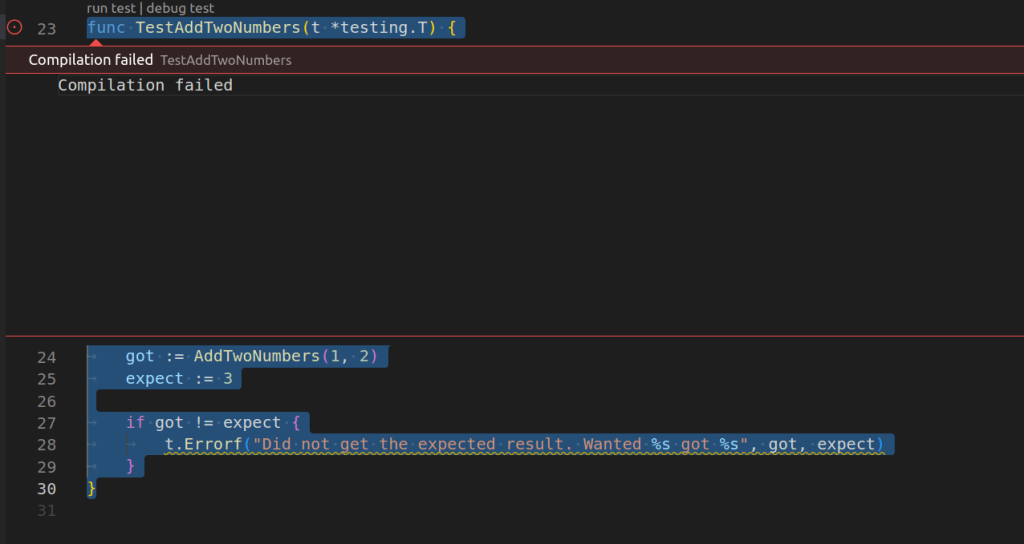
the .Errorf format %s has arg got of wrong type int error in the integrated terminal
Running tool: /snap/go/current/bin/go test -timeout 30s -run ^TestAddTwoNumbers$ greeting

# greeting
/home/developer/go/Greetings/greeting_test.go:28:3: (*testing.common).Errorf format %s has arg got of wrong type int
FAIL    greeting [build failed]

> Test run finished at 6/26/2023, 9:53:31 PM <
Changing the test to use a number specifier (%d) and the test now runs.
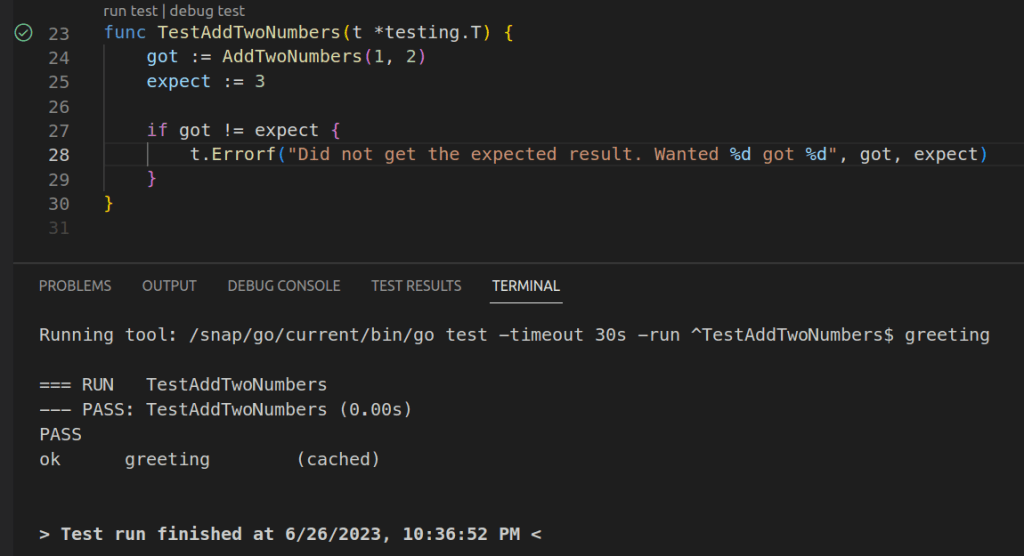
Acknowledgements
Michael Van Sickle for his excellent Pluralsight course Testing Go Applications
 iancarpenter.dev
Good post. In the output I think the variable called “expect” is what you want and “got” is, well, what was returned.