In this post I will demonstrate how to save all the worksheets within a Microsoft Excel file into individual CSV files using Excelize and the CSV functionality in the Standard Library.
The code shown in this post can be found on GitHub and was developed using Go 1.20.5, Visual Studio Code with the Go Extension.
Install Excelize
If you have not used Excelize before, the installation instructions can be found here.
High Level Overview
A reference to the Excel file is acquired and used to obtain a list of the worksheets. For each worksheet, using the CSV functionality provided by the Standard library, write the contents to a new file with the same name as the worksheet.
The Program
package main

package main

import (
	"encoding/csv"
	"fmt"
	"os"

	"github.com/xuri/excelize/v2"
)

func main() {

	xlFile := getExcelFile("TheProfessionals.xlsx")

	worksheets := xlFile.GetSheetList()

	for i := range worksheets {
		createCSVFile(xlFile, worksheets[i])
	}
}

func getExcelFile(fileName string) *excelize.File {

	xlFile, xlErr := excelize.OpenFile(fileName)
	if xlErr != nil {
		panic(xlErr)
	}
	defer func() {
		if xlErr := xlFile.Close(); xlErr != nil {
			panic(xlErr)
		}
	}()

	return xlFile
}

func createCSVFile(xlFile *excelize.File, worksheet string) {

	allRows, arErr := xlFile.GetRows(worksheet)
	if arErr != nil {
		panic(arErr)
	}

	csvFile, csvErr := os.Create(worksheet + ".csv")
	if csvErr != nil {
		fmt.Println(csvErr)
	}
	defer func() {
		if csvErr := csvFile.Close(); csvErr != nil {
			panic(csvErr)
		}
	}()

	writer := csv.NewWriter(csvFile)

	var writerErr error = writer.WriteAll(allRows)
	if writerErr != nil {
		fmt.Println(writerErr)
	}
}
The main function begins with a call to getExcelFile passing the name of the Excel file. This function returns a pointer to the Excelize file type which is stored in the variable xlFile and is used to access to the Excel document using Excelize functions.
Next, using the Excelize function GetSheetList the worksheet names are retrieved and stored in a string array called worksheets. For each worksheet, call the createCSVFile function passing the pointer to the Excel file and the name of the current worksheet.
createCSVFile calls the Excelise GetRows function to obtain all the rows from the worksheet and then creates a CSV file with the same name as the worksheet. The rows from the Excel file are written to the CSV file after which processing returns to the main function.
To remain focused on the goal of this post I have purposely skipped over the error handing code. If there is anything you are not sure about please let me know in the comments or contact me.
Demo
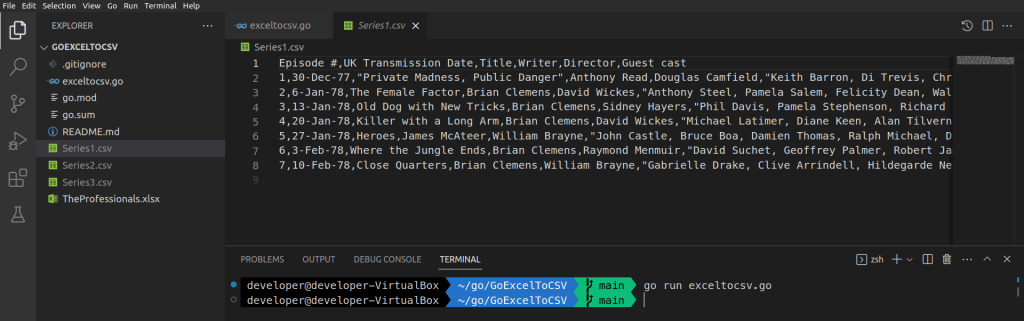
Included in the GitHub repo is an sample Excel file which can be used to try out the code shown in this post. The Excel file contains three worksheets each listing several episodes from the cult TV programme The Professionals.
Using the command go run exceltocsv.go to run the program once complete three new files are created; Series1.csv, Series2.csv and Series3.csv each containing the information from the respective worksheets.
Acknowledgements
The author and maintainers of the Excelize library
 iancarpenter.dev