As of Oracle APEX 23 there still isn’t a built-in framework event for working with the Region Display Selector (RDS)—something I recently bumped into while trying to show a specific region only when the ‘Show All’ tab was active. When other tabs were selected, that region should be hidden. In this post, I’ll walk through the issue and show you how I solved it using a Dynamic Action.
The Problem
Here is a page with a RDS.
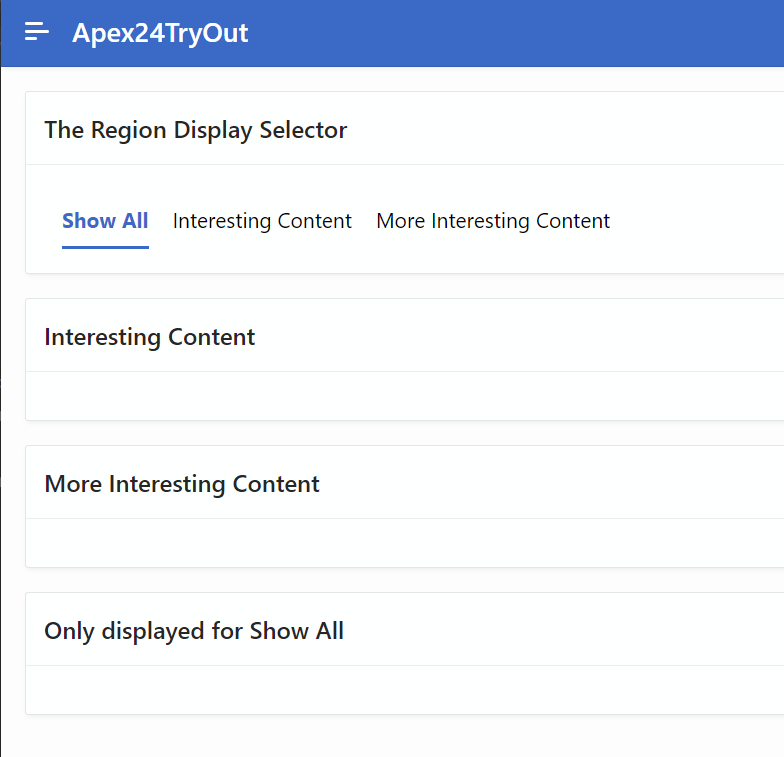
When the ‘Show All’ tab is active, the region labelled ‘Only displayed for Show All’ appears as expected. But when you switch to another tab—like ‘Interesting Content’ the ‘Only displayed for Show All’ region remains visible when it should be hidden.

The Solution
The first step is to provide the region ‘Only displayed for Show All’ with a static id, for this example I have used OnlyDisplayedForShowAll. This value will be used later in the code to display and hide this region.

Next create a new Click Dynamic Action as shown below.

Change the “Selection Type” to jQuery Selector and the jQuery Selector to .apex-rds a

Now add a true action of the type Execute JavaScript Code

Add the following code
var rdsSelected = $(this.triggeringElement).find("span").text();

if (rdsSelected === 'Show All') {
    $("#OnlyDisplayedForShowAll").show();
} else {
    $("#OnlyDisplayedForShowAll").hide();
}
The first line populates a variable with the RDS label which has been selected.
The rest of the code checks to see which RDS Tab has been selected, if it’s Show All then the region, identified by the static id that was provided earlier, is displayed otherwise it is hidden.
Running the page, and for the ‘Show All’ tab there is no change with ‘Only displayed for Show All’ correctly displayed.
Now when ‘Interesting Content’ tab becomes the active tab, only the ‘Interesting Content’ region is displayed with the ‘Only displayed for Show All’ no longer visible.

Acknowledgements
Thanks to this answer on Oracle Forums which helped me get started and was the genesis for this post.
 iancarpenter.dev