In this post I will show you how to automatically refresh a report every 10 seconds.
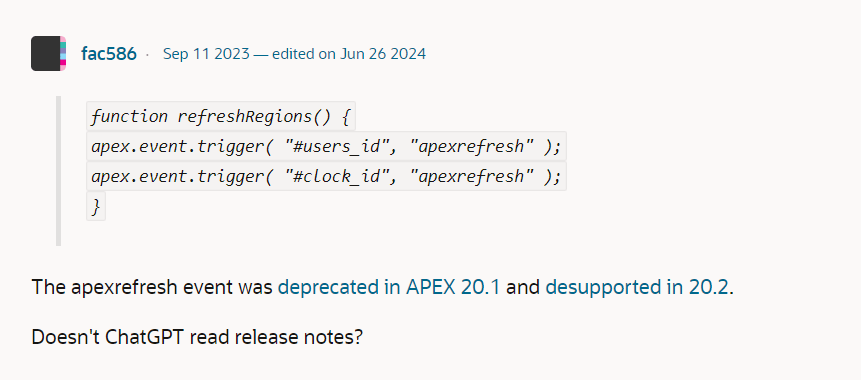
The existing examples of solving this problem I found on the web did not work with Apex 24.1.3 and it wasn’t until I stumbled across this thread that I found that examples I have been trying used the apexrefresh event which had been de-supported in release 20.2.
Prerequisites
The example shown was built using Apex version 24.1.3.
Goal
This chart should automatically refresh every ten seconds.

Step 1 Adding a Static ID
Select the region that contains the object that will be automatically refreshed. In this example the I have chosen Warnings

Next, from the selected Region properties find the Static ID field and provide a unique descriptive name. I have used Warnings_Chart
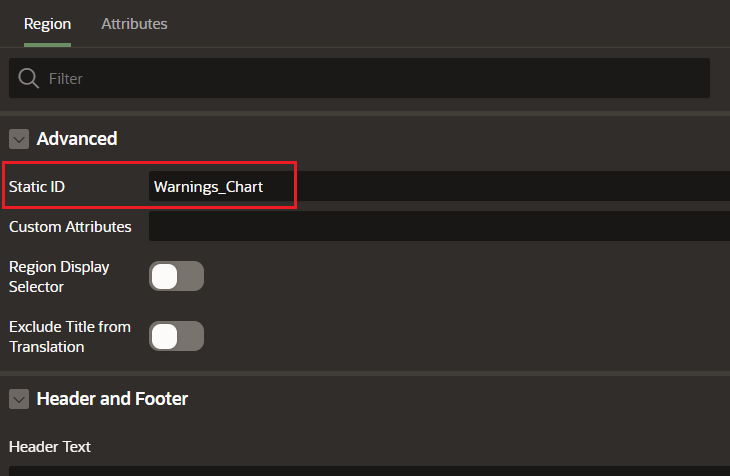
The reason for adding a static id is so it can be referenced in the Dynamic Action that will be created in the next step.
Step 2 Create a Dynamic Action
Navigate to the Dynamic Actions for the page and under the Page Load event create a new Dynamic Action. My example is called Refresh Warnings Chart.
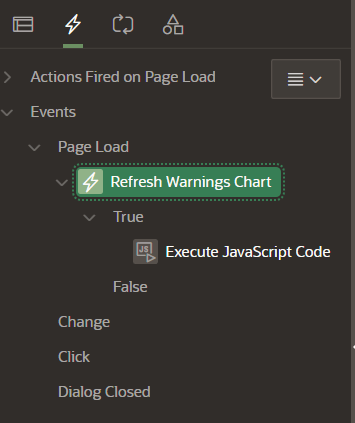
Under the True entry create a Execute JavaScript Code action. My example is shown below.

The code shown in the screen shot is
setInterval(function(){
    apex.region("Warnings_Chart").refresh();
}, 10000);
This code refreshes the region Warnings_Chart, which is the static id defined in Step 1 every 10 seconds.
Run the page and the region will refresh every ten seconds.
Acknowledgements
Thank you to the user fac586 who replied to this thread on the Oracle Forums.
 iancarpenter.dev
One thought on “Oracle Apex 24: Automatically Refreshing a Report”