This post demonstrates data redaction using Oracle Transparent Sensitive Data Protection (TSDP). We’ll configure the HR Employee table so that salary data is visible only to users with the MGR role—all other users will see zero when querying this column.
The example was developed using the Oracle Pre-Built Developer VMs for Oracle VM VirtualBox.
Implementation
Connect as sysdba or a suitably privileged user and execute the following commands
CREATE ROLE mgr;
GRANT mgr TO HR;
This ensures that by default the HR user will be able to view salary data.
Next, still connected as sysdba, create a type which classifies the type of column to protect, in this case employee salaries.
exec dbms_tsdp_manage.add_sensitive_type('EMPLOYEE_SALARY_TYPE');The next step is to create the TSDP policy by using the DBMS_TSDP_PROTECT.ADD_POLICY procedure within an anonymous block that defines the Data Redaction settings that you want to use.
DECLARE

  redact_feature_options dbms_tsdp_protect.feature_options;

BEGIN

  redact_feature_options('expression') := 'sys_context(''sys_session_roles'', ''MGR'') = ''FALSE''';

  redact_feature_options('function_type') := 'dbms_redact.full';

  dbms_tsdp_protect.add_policy
  (policy_name           => 'REDACT_SALARY_FULL',
   security_feature      => dbms_tsdp_protect.redact,
   policy_enable_options => redact_feature_options);

END;
/
This block creates a redaction policy called REDACT_SALARY_FULL that will fully redact data (e.g., salary) for users who do not have the MGR role.
Next associate this policy with the sensitive data type.
exec dbms_tsdp_protect.associate_policy
(policy_name    => 'REDACT_SALARY_FULL',
 sensitive_type => 'EMPLOYEE_SALARY_TYPE');
Next execute the following command:
exec dbms_tsdp_manage.add_sensitive_column
(schema_name    => 'HR',
 table_name     => 'EMPLOYEES',
 column_name    => 'SALARY',
 sensitive_type => 'EMPLOYEE_SALARY_TYPE');
This registers the SALARY column in the HR.EMPLOYEES table as a sensitive column of type EMPLOYEE_SALARY_TYPE using Oracle Transparent Sensitive Data Protection (TSDP). The final step is to enable the protection which is achieved using this anonymous block.
BEGIN

  DBMS_TSDP_PROTECT.ENABLE_PROTECTION_COLUMN
  (schema_name => 'HR',
   table_name  => 'EMPLOYEES',
   column_name => 'SALARY',
   policy      => 'REDACT_SALARY_FULL');

END;
/
Testing
When an HR user is assigned the MGR role, they gain the ability to view salaries in the Employees table.
SELECT EMPLOYEE_ID,
       FIRST_NAME,
       LAST_NAME,
       SALARY
  FROM employees
ORDER BY last_name; 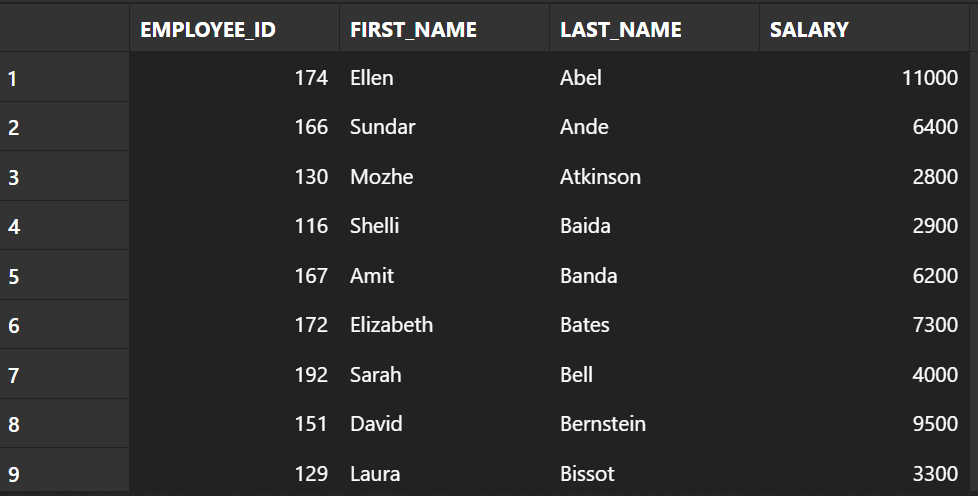
When the MGR role is revoked, the HR user will see zeros returned for salary values.
set role NONE;
SELECT EMPLOYEE_ID,
       FIRST_NAME,
       LAST_NAME,
       SALARY
  FROM employees
 ORDER BY last_name;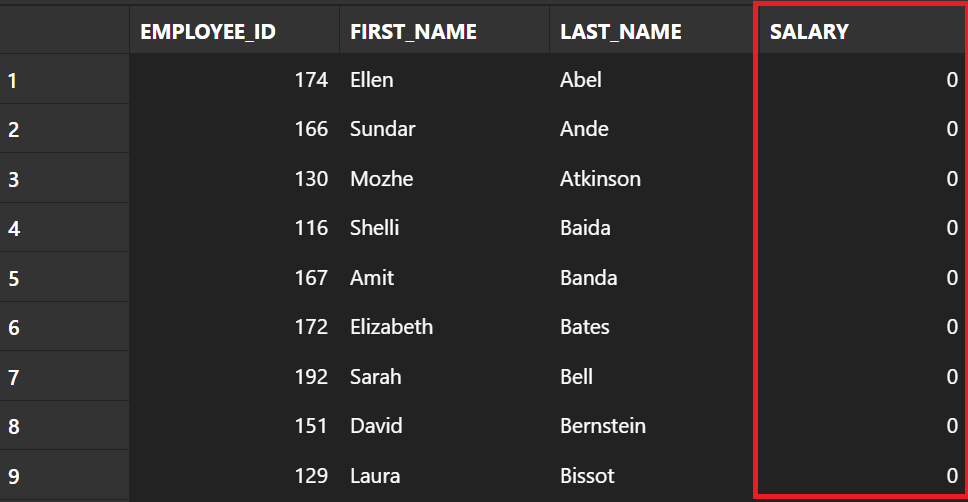
Acknowledgements
Oracle documentation Using Transparent Sensitive Data Protection
 iancarpenter.dev